


If you’re a student at the Vaal University of Technology (VUT), chances are you’ve heard about VUT Blackboard. But what exactly is it, and why is it so important? This guide will explain everything in a way that’s easy for anyone to understand—even if you’re just starting college or new to online learning.
What is VUT Blackboard and How Does It Work?
VUT Blackboard is an online learning platform used by the Vaal University of Technology in South Africa. It’s a powerful digital system that helps students and lecturers connect in a virtual classroom. Think of it as a school on your computer or phone, where you can attend classes, download notes, write tests, and communicate with your lecturers—all from one place.
The system works like a hub where each course has its own space. After you log in, you’ll see your courses listed on your dashboard. Inside each course, your lecturers will upload everything you need—assignments, announcements, videos, and even discussion forums where you can ask questions. Whether you’re in engineering, business, IT, or education, the Blackboard VUT platform helps you stay organized and updated.
With online learning becoming the new normal, platforms like blackboard vut ac za have become essential for modern education. Not only does it support traditional in-person learning, but it also allows for fully remote and hybrid courses.
How to Login to VUT Blackboard?
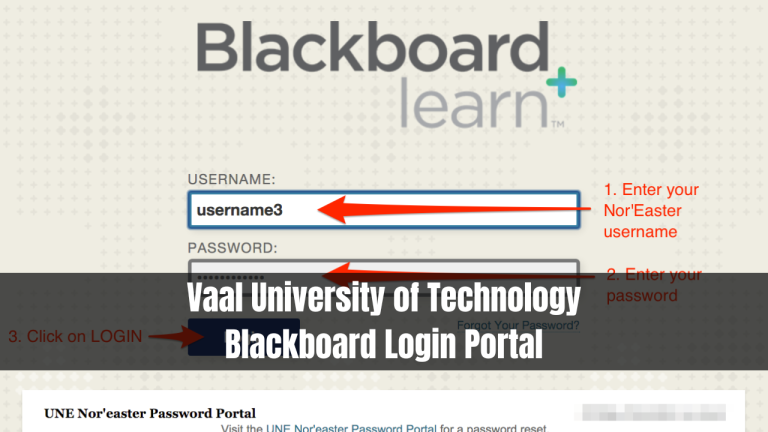
To log in to the VUT Blackboard, you need to visit the official login page. It’s a straightforward process that only takes a few minutes if you have the right details. Follow these steps:
- Open your web browser and go to: https://vut.blackboard.com/
- Click on the “Sign In” button.
- Enter your student number and password.
- Click “Login”, and you’ll be directed to your personal student dashboard.
Once you’re in, you’ll see a list of all your courses, announcements from lecturers, and other tools like calendars and grades.
Some students prefer going through the VUT student portal first at www.vut.ac.za, but logging in directly to the Blackboard site is faster.
Forgot Your VUT Blackboard Password? Here’s Help
It’s common to forget your password, especially when you’re managing several accounts. Don’t worry—resetting your vut blackboard login details is simple.

Where to Find the Login Page?
To reset your password, go to the official VUT Blackboard login page at vut.blackboard.com. Make sure you’re using the correct URL, because there are fake websites that look similar.
What Details Do You Need to Login?
To log in or reset your password, you need your:
- Student number (This is your official VUT ID)
- Email address (Usually your university email: studentnumber@edu.vut.ac.za)
- Access to the email inbox for receiving the reset link
Trouble Logging In?
If you’re still having trouble, contact ICT support at VUT. You can send them an email at support@vut.ac.za or call the IT Helpdesk. They’ll help you unlock your account or reset your password manually. Another option is to visit your nearest computer lab and ask for help from the support team.
Many students also search for vut elearning login or vut portal login, but those all lead to the same system—VUT Blackboard.
What Can You Do Inside VUT Blackboard?
Once logged in, VUT Blackboard offers a wide range of tools to support your academic journey. Here’s what you can expect inside the platform:
- Access all your courses in one place
- Download lecture slides, study materials, and eBooks
- Submit assignments online before the deadline
- Take quizzes and exams directly from your dashboard
- Participate in class discussions and forums
- View your grades and feedback from lecturers
- Receive announcements and important updates
- Sync with your calendar to manage your time better
The system is built to make studying easier. You can also find tools like plagiarism checkers, group project spaces, and private messaging between students and instructors. All of this helps you stay engaged, even if you’re studying from home.
Why Do Students Use VUT Blackboard?
There are many reasons why thousands of students use VUT Blackboard every single day. The platform is more than just a classroom—it’s an essential tool for student success.
Firstly, it provides 24/7 access to learning materials. Whether you’re a full-time or part-time student, you can study at your own pace. It also supports different learning styles—watch videos, read slides, or participate in forums.
Secondly, Blackboard learning makes it easy to track your progress. You can see your grades, find out which assignments are due, and set reminders—all in one place.
Finally, it keeps you connected. During the COVID-19 pandemic, online learning systems like vut blackboard ac za became essential. Even now, they remain the backbone of hybrid learning, helping students and teachers stay in touch.
VUT Blackboard App for Mobile
In today’s world, students prefer doing everything on their phones. The good news is that VUT Blackboard is fully available on mobile devices. You don’t need a laptop to stay updated.
App for Android and iPhone
The official Blackboard Learn app is available on both the Google Play Store and Apple App Store. Simply search for “Blackboard Learn” and download the app. After installation, search for “Vaal University of Technology” inside the app and log in using your student details.
Once you’re logged in, the app syncs with your account and displays all your courses and notifications, just like the desktop version.
How to Use the App
Using the mobile app is easy. You can:
- Open your course material anytime, anywhere
- Submit assignments directly from your phone
- Set push notifications for announcements
- Check your calendar and due dates
- Message your lecturers or classmates
- Stay active in discussion forums
The app is designed for students on the go, making vut blackboard mobile learning flexible and convenient.
VUT Blackboard Tips for New Students
If you’re new to VUT, here are a few tips to help you make the most of Blackboard:
- Log in every day to stay updated with new announcements
- Download materials when you have WiFi so you can study offline
- Use the calendar to manage your time
- Don’t wait until the last minute to submit assignments
- Engage in forums to ask questions and learn from others
- Try the mobile app if you can’t access a computer regularly
With these tips, new students can quickly get comfortable using vut blackboard login portal and stay ahead in their academic journey.
VUT Online Learning Made Easy
Online learning at VUT has been simplified through Blackboard. Whether you’re doing a full online degree or just attending a few modules remotely, the system supports you from start to finish. You don’t have to worry about losing papers or missing deadlines. Everything is digital and organized. With features like real-time grades, discussion boards, and assignment tracking, students are empowered to take charge of their learning experience.
Additionally, online learning opens the door to flexible schedules. If you’re working or taking care of family responsibilities, you can log in to blackboard vut ac za in your own time and complete your work.
The Bottom Line
To sum it up, VUT Blackboard is your go-to platform for everything related to learning at Vaal University of Technology. It simplifies your academic life by bringing all your study tools into one place. Whether you’re attending classes in person or fully online, Blackboard makes sure you never miss a thing.
From logging in, accessing your course materials, submitting assignments, to checking your results—it’s all just a few clicks away. And with the mobile app, you can carry your classroom in your pocket.
